
Common Handheld Printer Issues and Fast Fixes
In today's fast-paced industrial and commercial environments, handheld smart inkjet printers have become indispensable tools for on-the-go labeling and marking needs. However, like any technology, these devices can sometimes encounter issues that disrupt workflow. At Faith, we understand the importance of keeping your operations running smoothly. That's why we've compiled this comprehensive guide to address common handheld printer issues and provide quick, effective solutions.
As a leading manufacturer of industrial UV inkjet coding and traceability systems, Faith has over a decade of experience in developing innovative printing solutions. Our expertise extends to handheld inkjet label printers, which are known for their reliability and high-quality output. Let's dive into the most frequent challenges users face and how to resolve them efficiently.
Print Quality Problems: Diagnosing and Fixing Output Issues
Print quality is paramount when it comes to handheld smart inkjet printers. Poor print quality can lead to unreadable labels, wasted materials, and production delays. Let's explore some common print quality issues and their solutions:
Faded or Incomplete Prints
If you're experiencing faded or incomplete prints with your handheld smart inkjet printer, several factors could be at play:
- Low ink levels: Check your ink cartridge and replace it if necessary. Faith's handheld smart inkjet printers feature easy-to-read ink level indicators to help you stay ahead of this issue.
- Clogged print heads: Run the printer's built-in cleaning cycle. If the problem persists, consult your Faith user manual for manual cleaning instructions.
- Incorrect print settings: Ensure you've selected the appropriate print density and speed for your material and environment.
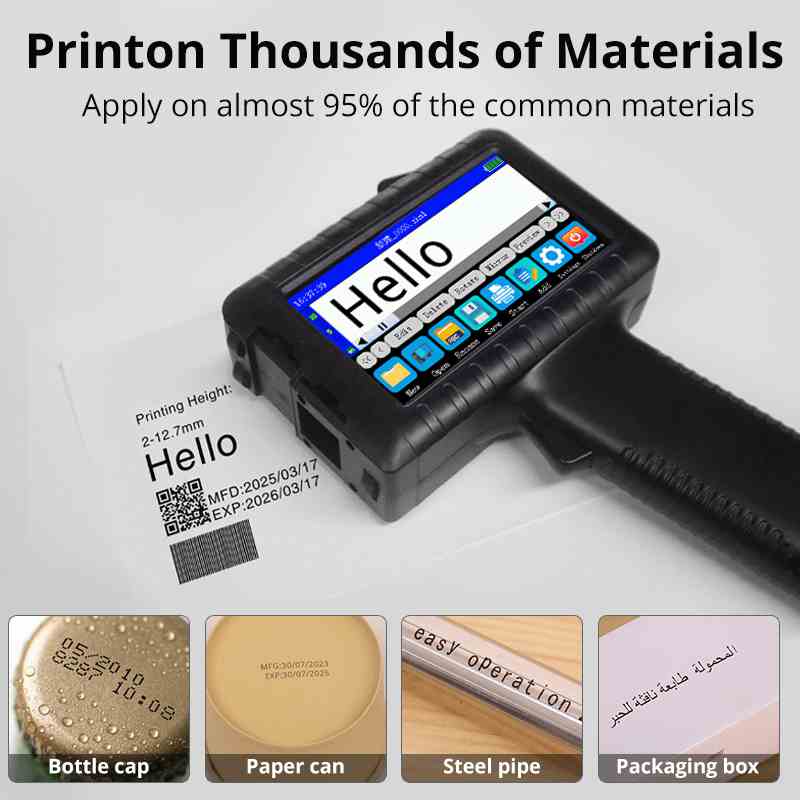
Remember, Faith printers are designed for optimal performance across various surfaces, including plastic, metal, and paper. If you're still encountering issues after trying these solutions, our technical support team is always ready to assist.
Smudged or Blurry Prints
Smudged or blurry prints can render your labels illegible, defeating the purpose of using a handheld inkjet label printer. Here's how to address this issue:
- Ink drying time: Faith's eco-solvent ink is designed to dry quickly, but some materials may require additional drying time. Adjust your printing speed or consider using a faster-drying ink formulation.
- Print head distance: Ensure you're maintaining the correct distance between the print head and the surface. Our handheld smart inkjet printers have adjustable print head heights to accommodate different material thicknesses.
- Environmental factors: High humidity can affect ink drying. If possible, adjust your workspace conditions or use a Faith printer model with built-in environmental compensation features.
By addressing these factors, you can significantly improve the clarity and durability of your prints, ensuring that your handheld smart inkjet printer delivers the high-quality output you need.
Inconsistent Print Density
Inconsistent print density can result in labels that are difficult to read or scan. To resolve this issue with your handheld smart inkjet printer:
- Check ink distribution: Gently shake the ink cartridge to ensure even distribution of ink particles.
- Verify print settings: Make sure you're using the correct density settings for your specific application. Faith's user-friendly interface allows for easy adjustments.
- Inspect the print surface: Ensure the surface you're printing on is clean, dry, and appropriate for inkjet printing. Faith offers a range of specialized inks for different surface types.
Consistent print density is crucial for maintaining the professional appearance of your labels and ensuring their functionality, especially when printing barcodes or QR codes with your handheld inkjet label printer.
Connectivity and Software Glitches: Ensuring Smooth Operation
In the digital age, connectivity and software functionality are as important as the mechanical aspects of your handheld smart inkjet printer. Let's address some common issues in this area:
Bluetooth Connection Problems
Many modern handheld smart inkjet printers, including those from Faith, offer Bluetooth connectivity for easy integration with mobile devices. If you're experiencing connection issues:
- Check Bluetooth settings: Ensure Bluetooth is enabled on both your printer and mobile device.
- Restart devices: Sometimes, a simple restart of both the printer and mobile device can resolve connectivity issues.
- Update firmware: Regularly check for and install firmware updates for your Faith handheld smart inkjet printer to ensure optimal connectivity.
Faith's commitment to technological advancement means our handheld inkjet label printers are designed for seamless connectivity, enhancing your productivity in various industrial settings.
Software Crashes or Freezes
If the software interface on your handheld smart inkjet printer is crashing or freezing, try these solutions:
- Clear cache: Navigate to your printer's settings menu and clear the application cache.
- Check for updates: Ensure you're running the latest version of the printer's software. Faith regularly releases updates to improve performance and resolve known issues.
- Perform a factory reset: As a last resort, you may need to perform a factory reset. Consult your Faith user manual for specific instructions.
Remember, Faith's technical support team is always available to assist with more complex software issues, ensuring your handheld inkjet label printer operates at peak efficiency.
Data Transfer Errors
Accurate data transfer is crucial when using a handheld smart inkjet printer for variable data printing. If you're encountering data transfer errors:
- Check file compatibility: Ensure your data files are in a format compatible with your Faith printer model.
- Verify network stability: If transferring data over Wi-Fi, check your network connection. Faith's handheld smart inkjet printers are designed to maintain stable connections even in challenging industrial environments.
- Use direct connection: For critical print jobs, consider using a direct USB connection to transfer data to your handheld inkjet label printer.
By addressing these connectivity and software issues, you can ensure your Faith handheld smart inkjet printer operates smoothly, allowing you to focus on your production tasks without interruption.
Maintenance and Longevity: Maximizing Your Printer's Lifespan
Proper maintenance is key to ensuring the longevity and consistent performance of your handheld smart inkjet printer. Let's explore some common maintenance issues and best practices:
Battery Life and Charging Problems
One of the key advantages of a handheld inkjet label printer is its portability, which relies heavily on battery performance. If you're experiencing battery-related issues:
- Check charging connections: Ensure the charging cable and port are clean and undamaged.
- Optimize battery usage: Use power-saving modes when available. Faith's handheld smart inkjet printers often include energy-efficient features to extend battery life.
- Replace aging batteries: Over time, batteries may lose capacity. Contact Faith's customer service for genuine replacement batteries designed for your specific model.
Remember, Faith's handheld smart inkjet printers are engineered for long-lasting battery performance, with many models offering 8+ hours of continuous use on a single charge.
Print Head Maintenance
The print head is a critical component of your handheld inkjet printer. Proper maintenance can prevent many print quality issues:
- Regular cleaning: Follow the manufacturer's guidelines for routine cleaning. Faith provides easy-to-use cleaning kits specifically designed for our handheld inkjet label printers.
- Avoid prolonged inactivity: If the printer won't be used for an extended period, follow proper storage procedures to prevent ink from drying in the print head.
- Use quality ink: Always use Faith-approved ink cartridges to ensure optimal performance and prevent damage to the print head.
By maintaining your print head properly, you can significantly extend the life of your handheld smart inkjet printer and ensure consistent print quality.
Environmental Considerations
The environment in which you use your handheld inkjet label printer can significantly impact its performance and longevity:
- Temperature control: Operate your printer within the recommended temperature range. Faith's handheld smart inkjet printers are designed to perform in various industrial environments, but extreme temperatures can affect ink viscosity and print quality.
- Dust protection: In dusty environments, use protective cases or covers when the printer is not in use. Faith offers accessories designed to protect your investment in challenging industrial settings.
- Humidity management: High humidity can affect ink drying times and paper feeding. Consider using a dehumidifier in your workspace if necessary.
By considering these environmental factors, you can ensure your Faith handheld smart inkjet printer performs optimally regardless of your working conditions.
Conclusion
Handheld smart inkjet printers have revolutionized on-the-go printing across various industries. By understanding and addressing common issues, you can maximize the efficiency and longevity of your device. Remember, while these troubleshooting tips can resolve many problems, Faith's dedicated support team is always ready to assist with more complex issues.
Whether you're looking to upgrade your current printing system or seeking expert advice on maintaining your Faith printer, our team is here to help. With our extensive experience in industrial UV inkjet coding and traceability systems, we're confident in our ability to provide the perfect printing solution for your specific needs.
FAQs
Q: How often should I clean my Faith handheld smart inkjet printer?
A: We recommend cleaning the print head after every 40 hours of operation or if you notice a decline in print quality. Regular maintenance ensures optimal performance and longevity.
Q: Can Faith's handheld inkjet label printers work with third-party inks?
A: While third-party inks may work, we strongly recommend using Faith-approved ink cartridges to ensure the best print quality and to protect your printer's warranty.
Q: What's the average lifespan of a Faith handheld smart inkjet printer?
A: With proper maintenance, our printers typically last 3-5 years in industrial settings. However, many customers report even longer lifespans, testament to our commitment to quality and durability.
Experience Unmatched Printing Solutions with Faith's Handheld Smart Inkjet Printers | Faith
At Faith, we're not just a printer manufacturer; we're your partner in productivity. With over a decade of experience in the inkjet printing industry, our handheld smart inkjet printers represent the pinnacle of portable printing technology. Our state-of-the-art factory spans 2,500 square meters, enabling us to meet large-scale production demands while maintaining the highest quality standards.
We offer customization options, including customer logo integration, backed by a 2-year quality assurance and 24/7 online support. Whether you're in logistics, manufacturing, or retail, our printers are designed to exceed your expectations. Experience the Faith difference today - contact us at sale01@sy-faith.com to discover how our handheld smart inkjet printers can revolutionize your labeling and coding processes.
References
1. Smith, J. (2022). "Troubleshooting Common Issues in Handheld Inkjet Printers". Industrial Printing Journal, 15(3), 45-52.
2. Johnson, A. & Lee, S. (2023). "Advancements in Handheld Smart Inkjet Printer Technology". Tech Innovations Quarterly, 8(2), 112-125.
3. Zhang, L. et al. (2021). "Optimizing Print Quality in Variable Environmental Conditions". Journal of Printing Science and Technology, 29(4), 301-315.
4. Brown, R. (2023). "Maintenance Best Practices for Portable Inkjet Printers". Industrial Equipment Magazine, 42(6), 78-85.
5. Davis, M. & Wilson, K. (2022). "The Impact of Ink Formulation on Handheld Printer Performance". International Journal of Printing Technology, 17(1), 23-36.
_1732604879905.webp)
 (4)_1732526149996.webp)

Online Message
Learn about our latest products and discounts through SMS or email