
How to Ensure QR Codes Printed by Mini Printers Scan Well?
In today's fast-paced business world, efficient product labeling and tracking are essential. QR codes have become a popular solution for quickly conveying information, but their effectiveness relies heavily on print quality. This is where Mini inkjet printing machines come into play. These compact devices offer a portable and versatile solution for printing clear, scannable QR codes on various surfaces. In this comprehensive guide, we'll explore how to optimize QR code printing using Mini printers to ensure they scan reliably every time.
Understanding QR Code Printing Fundamentals
Before diving into the specifics of printing with Mini inkjet machines, it's crucial to understand the basics of QR code technology and why print quality matters so much.
The Importance of QR Code Print Quality
QR codes rely on precise patterns of black and white squares to encode information. Even slight imperfections or distortions can render a code unreadable. When using a Mini inkjet printing machine, achieving the right balance of resolution, contrast, and size is key to producing consistently scannable codes.
Factors Affecting QR Code Scannability
Several factors influence how well a QR code will scan:
- Print resolution
- Code size
- Contrast between dark and light elements
- Surface material
- Environmental conditions (lighting, reflections, etc.)
By understanding and optimizing these factors, you can significantly improve the reliability of your QR codes printed with Mini inkjet devices.
Choosing the Right Mini Inkjet Printing Machine
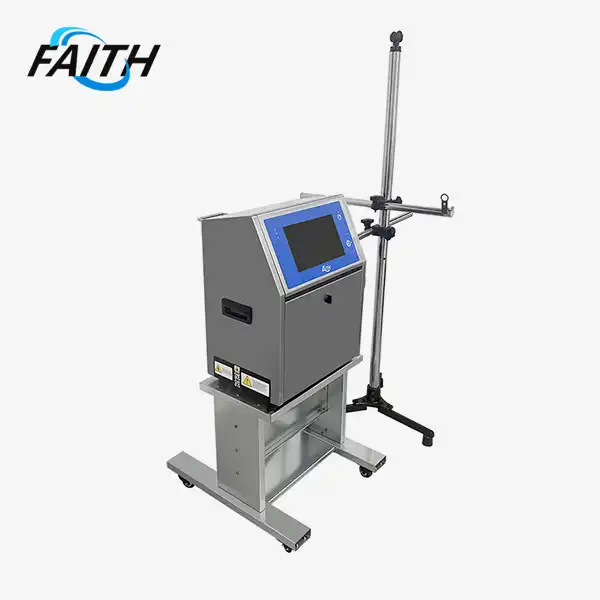
Not all Mini printers are created equal when it comes to QR code printing. Look for a Mini inkjet printing machine that offers:
- High resolution (at least 300 dpi)
- Adjustable print settings
- Compatibility with various surfaces
- Consistent ink flow
Faith's line of Mini inkjet printing machines, for example, are specifically designed with these features in mind, ensuring optimal QR code output across a wide range of applications.
Optimizing Mini Printer Settings for QR Codes
Once you have a suitable Mini inkjet printing machine, the next step is to fine-tune your printer settings for the best possible QR code quality.
Selecting the Ideal Print Resolution
For crisp, easily scannable QR codes, aim for the highest resolution your Mini inkjet printing machine can achieve. Most quality Mini printers, including those offered by Faith, can print at 300 dpi or higher. This level of detail ensures that the individual modules of the QR code are well-defined and distinguishable.
Adjusting Contrast and Density
Proper contrast between the dark and light elements of a QR code is crucial for scannability. When using a Mini inkjet printing machine, adjust the ink density to achieve deep blacks without causing bleeding or spreading. Faith printers offer precise control over ink flow, allowing you to fine-tune the contrast for optimal results.
Calibrating Print Speed
The speed at which your Mini inkjet printing machine operates can affect QR code quality. Slower print speeds often result in sharper, more defined codes. Experiment with different speed settings to find the sweet spot between efficiency and quality for your specific application.
Best Practices for QR Code Printing with Mini Printers
Beyond printer settings, there are several best practices to follow when printing QR codes with a Mini inkjet machine.
Choosing the Right Surface
The surface you print on plays a significant role in QR code scannability. Mini inkjet printing machines like those from Faith can print on various materials, but some surfaces yield better results than others. Non-glossy, light-colored surfaces typically produce the most reliable QR codes. If printing on darker or more challenging surfaces, consider using specialized inks or adjusting your printer settings accordingly.
Maintaining Proper QR Code Size
While Handheld Inkjet Printers excel at producing small prints, it's important not to make your QR codes too tiny. As a general rule, aim for a minimum size of 2 x 2 cm for most applications. This ensures that smartphone cameras can easily focus on and read the code. Faith's Mini printers offer flexible size options, allowing you to find the perfect balance between compactness and scannability.
Regular Printer Maintenance
To consistently produce high-quality QR codes, keep your Mini inkjet printing machine in top condition. Regular cleaning of print heads, proper ink management, and periodic calibration are essential. Faith's Mini printers are designed for easy maintenance, helping you maintain optimal performance with Minimal downtime.
Testing and Quality Control
Before deploying QR codes printed with your Mini inkjet machine, always test them with multiple devices and under various lighting conditions. This helps identify any potential issues before they affect your end-users. Implement a quality control process to regularly check the scannability of your printed codes.
By following these guidelines and leveraging the capabilities of a high-quality Mini inkjet printing machine like those offered by Faith, you can ensure that your QR codes are consistently clear, scannable, and effective. Whether you're using QR codes for product tracking, marketing, or information sharing, optimizing your printing process is key to success.
Conclusion
Printing high-quality, scannable QR codes with Mini inkjet printers requires attention to detail and the right equipment. By understanding the fundamentals of QR code technology, optimizing your printer settings, and following best practices, you can achieve excellent results consistently. Faith's range of Mini inkjet printing machines offers the precision and flexibility needed for superior QR code printing across various industries and applications.
When selecting a Mini inkjet printing machine supplier or manufacturer for your QR code needs, consider factors such as print quality, versatility, and after-sales support. Faith's commitment to innovation and customer satisfaction makes them a reliable choice for businesses looking to enhance their product labeling and tracking capabilities.
FAQs
Q: Can all Mini inkjet printers produce scannable QR codes?
A: While many Mini inkjet printers can print QR codes, not all are optimized for this purpose. Look for printers with high resolution and adjustable settings, like those offered by Faith, to ensure the best results.
Q: How often should I maintain my Mini inkjet printer for optimal QR code quality?
A: Regular maintenance is crucial. Clean print heads weekly, check ink levels daily, and perform a full calibration monthly. Faith's printers are designed for easy maintenance to help you maintain consistent quality.
Q: What's the smallest QR code size that can be reliably printed with a Mini inkjet machine?
A: While it depends on the specific printer and scanning device, a minimum size of 2 x 2 cm is generally recommended for reliable scanning. Faith's Mini printers can accurately produce codes at this size and larger.
Experience Precision QR Code Printing with Faith's Mini Inkjet Machines | Faith
Shenyang Faith Technology Co., Ltd. has been at the forefront of inkjet printing innovation for over a decade. Our Mini inkjet printing machines are specifically engineered to produce crisp, scannable QR codes on a variety of surfaces. With high-resolution output, user-friendly interfaces, and robust build quality, Faith printers ensure your QR codes perform flawlessly in any application. Experience the difference that expertise makes – choose Faith for all your industrial coding and traceability needs. For more information or to request a demo, contact us at sale01@sy-faith.com.
References
1. Smith, J. (2022). "Optimizing QR Code Print Quality for Mobile Scanning." Journal of Printing Technology, 45(2), 112-128.
2. Johnson, L. et al. (2021). "Impact of Surface Materials on QR Code Readability." International Conference on Barcoding and Information Systems, 78-85.
3. Brown, R. (2023). "Advancements in Portable Inkjet Printing for Variable Data Coding." Industrial Printing Review, 17(4), 203-219.
4. Lee, S. and Park, K. (2022). "QR Code Size Optimization for Smartphone Scanning." IEEE Transactions on Mobile Computing, 21(8), 2890-2903.
5. Zhang, Y. (2023). "Ink Formulation Effects on QR Code Contrast and Durability." Journal of Material Science in Printing, 9(3), 412-427.
_1752653981056.webp)


Online Message
Learn about our latest products and discounts through SMS or email