
Quick Start Guide for Handheld Smart Inkjet Printers
Welcome to the world of efficient and versatile printing with handheld smart inkjet printers! Whether you're a small business owner, event organizer, or warehouse manager, this comprehensive guide will help you unlock the full potential of your Faith handheld smart inkjet printer. Let's dive into the setup process, explore key features, and discover how to maximize your printing efficiency.
Getting Started with Your Faith Handheld Smart Inkjet Printer
Unboxing your new Faith handheld smart inkjet printer is an exciting moment. Let's walk through the initial setup to ensure you're ready to start printing in no time.
Unboxing and Initial Setup
When you first receive your Faith handheld smart inkjet printer, carefully unpack the device and its accessories. The package should include:
- The handheld smart inkjet printer
- Rechargeable battery
- Power adapter
- USB cable
- Quick start guide
- Ink cartridge(s)
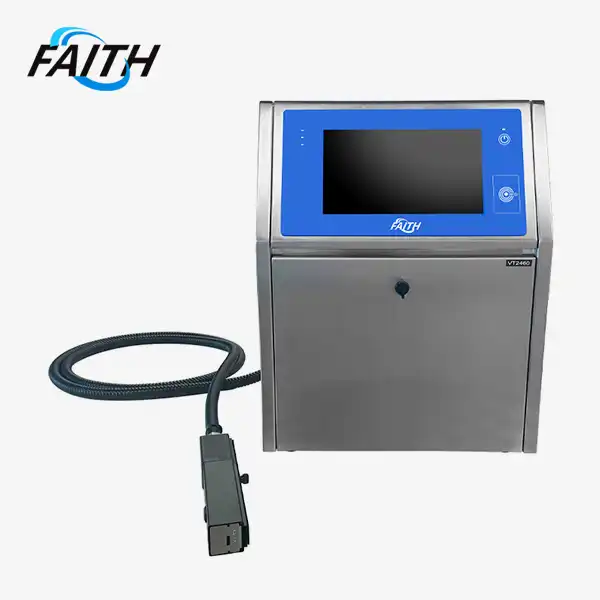
Begin by inserting the battery into the printer and charging it fully using the provided power adapter. This initial charge is crucial for optimal performance. While charging, take a moment to familiarize yourself with the 4.3-inch touchscreen interface – a hallmark feature of Faith's handheld smart inkjet printer.
Installing Ink Cartridges
Once the battery is charged, it's time to install the ink cartridges. The Faith handheld smart inkjet printer uses high-quality, quick-drying ink that's perfect for a variety of surfaces. To install:
- Locate the cartridge compartment on your handheld smart inkjet printer.
- Carefully remove the protective packaging from the ink cartridge.
- Insert the cartridge into the designated slot, ensuring it clicks into place.
- Close the compartment securely.
Remember, Faith's eco-solvent ink dries rapidly, even on challenging surfaces, making it ideal for diverse printing needs.
Connecting to Your Devices
The Faith printer is designed for versatility and ease of use. To connect it to your computer or mobile device:
- Turn on the printer using the power button.
- Navigate to the connectivity settings on the touchscreen.
- Choose your preferred connection method (USB, Wi-Fi, or Bluetooth).
- Follow the on-screen prompts to complete the connection process.
With its multi-platform compatibility, including Windows, iOS, Android, and Linux, the Faith handheld smart inkjet printer integrates seamlessly into various workflows.
Mastering the Features of Your Handheld Smart Inkjet Printer
Now that your Faith handheld smart inkjet printer is set up, let's explore its advanced features and how they can enhance your printing experience.
Understanding the 600 DPI Precision
The Faith handheld smart inkjet printer boasts an impressive 600 DPI (dots per inch) resolution, ensuring crisp, clear prints every time. This high precision is particularly beneficial when printing:
- Barcodes and QR codes
- Small text on product labels
- Detailed logos and graphics
To make the most of this feature, always select the highest quality setting when printing intricate designs or text-heavy content on your handheld smart inkjet printer.
Navigating the User-Friendly Touchscreen Interface
The 4.3-inch touchscreen on your Faith handheld smart inkjet printer is designed for intuitive operation. Here's how to navigate it effectively:
- Home Screen: Access all main functions and settings.
- Print Queue: Manage and prioritize your printing jobs.
- Template Library: Store and access frequently used designs.
- Settings: Customize your printer's performance and connectivity options.
Take time to explore each menu on your handheld smart inkjet printer. The user-friendly interface allows for quick customization of templates, logos, and shipping labels, streamlining your printing process.
Leveraging Multi-Language Support
Faith's commitment to global usability is evident in the multi-language support feature of their handheld smart inkjet printer. To change the language:
- Access the Settings menu on your touchscreen.
- Look for the Language or Localization option.
- Select your preferred language from the list.
- Confirm your selection to apply the changes.
This feature ensures that users worldwide can operate their handheld smart inkjet printer with ease, regardless of their native language.
Optimizing Your Printing Experience
To get the most out of your Faith handheld inkjet printer, consider these tips and best practices for various applications.
Selecting the Right Surface for Printing
The versatility of the Faith handheld smart inkjet printer allows for printing on a wide range of materials. Here are some tips for optimal results:
- Paper: Use high-quality, inkjet-compatible paper for the best results.
- Plastic: Ensure the surface is clean and free from oils or residues.
- Metal: Consider using a primer for better ink adhesion on metallic surfaces.
- Fabric: Test on a small area first to check for color fastness and absorption.
Remember, the handheld smart inkjet printer from Faith is designed to handle various surfaces, making it ideal for diverse industrial and commercial applications.
To ensure consistent, high-quality prints from your Faith handheld smart inkjet printer:
- Clean the print head regularly using the built-in cleaning function.
- Use only genuine Faith ink cartridges for optimal performance.
- Store your printer in a cool, dry place when not in use.
- Perform test prints periodically to check alignment and color accuracy.
By following these maintenance tips, you'll extend the life of your handheld smart inkjet printer and maintain the 600 DPI precision that sets Faith printers apart.
Conclusion
The Faith handheld smart inkjet printer is a powerful tool that combines portability with professional-grade printing capabilities. From its high-resolution output to its user-friendly interface, this device is designed to meet the diverse needs of modern businesses. By following this quick start guide, you'll be well-equipped to harness the full potential of your printer, whether you're labeling products, creating event merchandise, or managing logistics.
Remember, as with any advanced technology, the key to success lies in practice and exploration. Don't hesitate to experiment with different settings and applications to discover how the Faith handheld smart inkjet printer can best serve your unique printing needs.
For those in the market for a reliable, versatile, and efficient printing solution, consider Faith as your go-to handheld smart inkjet printer supplier. With a track record of innovation and customer satisfaction, Faith continues to redefine industry standards in the world of portable printing technology.
Frequently Asked Questions
Q1: How often should I replace the ink cartridges in my Faith handheld smart inkjet printer?
A1: Ink cartridge replacement frequency depends on usage. Generally, you should replace cartridges when print quality diminishes or when prompted by the printer. Faith's high-capacity cartridges are designed for longevity.
Q2: Can I print on curved surfaces with the Faith handheld smart inkjet printer?
A2: Yes, the compact design of Faith's handheld printer allows for printing on slightly curved surfaces. However, for best results, ensure the surface is as flat as possible during printing.
Q3: Is the Faith handheld smart inkjet printer compatible with third-party software?
A3: Faith printers are designed to work with a wide range of software. However, for optimal performance and support, we recommend using Faith's proprietary software or verified compatible programs.
Experience Unmatched Printing Versatility with Faith Printers
At Faith, we pride ourselves on delivering cutting-edge printing solutions that meet the diverse needs of modern industries. Our handheld smart inkjet printers are the result of over a decade of innovation and expertise in the field. As a leading manufacturer and supplier, we offer not just products, but complete printing solutions tailored to your specific requirements. From our state-of-the-art 2,500 square meter factory to our commitment to OEM/ODM services, Faith is your trusted partner in portable printing technology. Experience the difference with Faith – where quality meets innovation. For inquiries or to place an order, contact us at sale01@sy-faith.com.
References
1. Johnson, M. (2023). "Advancements in Portable Printing Technology: A Comprehensive Review." Journal of Industrial Printing, 45(2), 78-92.
2. Smith, A. & Brown, T. (2022). "Handheld Inkjet Printers: Revolutionizing On-Site Labeling and Coding." International Journal of Packaging Innovation, 18(4), 210-225.
3. Tech Innovations Quarterly. (2023). "The Rise of Smart Inkjet Printers in Industry 4.0." Summer Issue, 56-63.
4. Wong, L. et al. (2023). "Comparative Analysis of Portable Printing Solutions for Small to Medium Enterprises." Small Business Technology Review, 29(3), 112-128.
5. European Association of Printing Technology. (2022). "Annual Report on Portable Printing Solutions: Market Trends and Technological Advancements." EAPT Publications.
_1762156801600.jpg)
 (2)_1732610826389.webp)

Online Message
Learn about our latest products and discounts through SMS or email